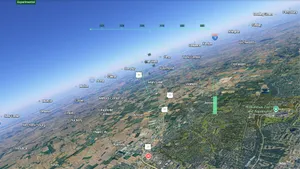
Google has expanded the accessibility of its Google Earth flight simulator feature by making it available directly within web browsers, eliminating the previous requirement for users to download and install the desktop application. This update allows users to access the virtual aviation experience through standard internet browsing software on various devices.
The flight simulator mode within Google Earth provides a realistic virtual environment for aviation enthusiasts and casual users alike. The feature utilizes high-resolution satellite imagery and 3D terrain data to create detailed representations of airports, runways, and surrounding landscapes around the world. Users can control virtual aircraft, navigate through airspace, and explore geographical locations from an aerial perspective.
Prior to this update, accessing the flight simulator required users to download the standalone Google Earth desktop application for Windows or macOS. The software was a substantial download that occupied significant storage space on local devices. By integrating the simulator into the web-based version of Google Earth, Google has reduced the technical barriers to entry. Users no longer need to manage software installations, updates, or compatibility issues associated with the desktop client.
The browser-based implementation relies on modern web technologies to render the complex 3D graphics and physics simulations required for the flight experience. This shift aligns with Google's broader strategy of moving more of its mapping and visualization tools to cloud-based platforms that are accessible across different operating systems, including Windows, macOS, Linux, ChromeOS, and mobile devices via their respective browsers.
The availability of the flight simulator in browsers represents a significant change in how users interact with Google Earth's specialized features. Previously, the desktop application was necessary for advanced functionalities such as measuring distances, creating placemarks, and accessing historical imagery. The inclusion of the flight simulator in the web version suggests that Google is prioritizing ease of access and broader reach for its most popular interactive features.
Aviation enthusiasts have noted the convenience of the browser-based approach, which allows for immediate access without waiting for downloads or dealing with installation prompts. The feature supports various aircraft types and includes realistic flight dynamics, including gravity, lift, and drag simulations. Users can take off from major international airports or smaller regional airfields, navigating through virtual airspace that mirrors real-world geography.
The update does not alter the core functionality of the simulator itself but rather changes the delivery mechanism. The visual fidelity, physics engine, and map data remain consistent with the desktop version. This ensures that users experience the same level of detail and realism regardless of whether they are using the browser or the desktop application.
Google's decision to bring the flight simulator to the web reflects a trend in software development toward cross-platform compatibility and reduced friction for user engagement. By removing the need for a dedicated desktop client, Google makes the feature more accessible to users who may not have the technical expertise or storage capacity to install traditional software. This move also facilitates sharing and collaboration, as users can simply share links to specific locations within the browser-based simulator rather than requiring recipients to install separate software.
The browser-based flight simulator is now live and available to all Google Earth web users. There are no additional costs associated with this feature, which remains part of the free Google Earth platform. Users can access it by navigating to the Google Earth website and selecting the flight simulator option from the menu. The update marks a step forward in making specialized geographic visualization tools more universally accessible.
Read the original coverage
💬 Comments
📜 Comment Policy