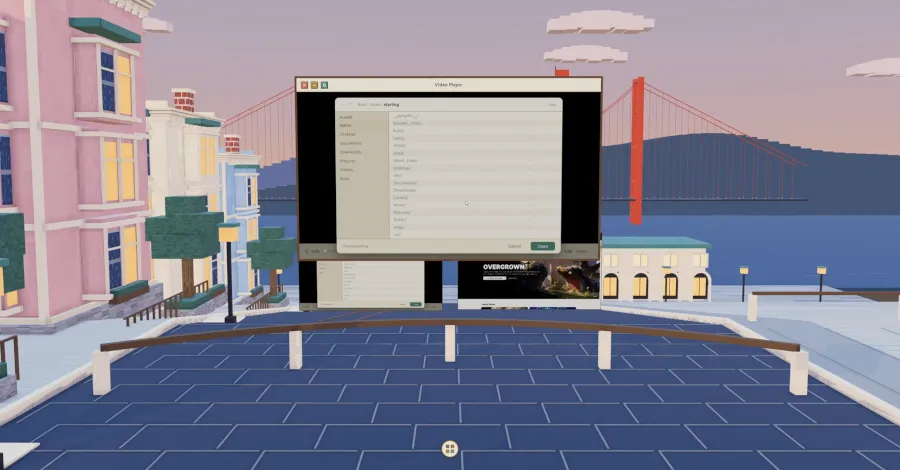
The Starling Linux desktop environment has released version 0.5, introducing an optional 3D desktop mode featuring a “walkable 3D waterfront city.” The update, developed with assistance from AI model Claude Fable 5.1, also adds support for running Windows applications through WSL2 with Ubuntu 26.04 using RDP.
The new 3D desktop mode allows users to navigate a virtual city environment alongside their open applications. According to the release announcement, “Starling keeps the familiar 2D desktop and adds a walkable 3D waterfront city.” The city includes animated elements like moving boats, traffic, and clouds, as well as features such as a clock tower and dynamic sunset lighting, with window chrome in cream, bronze, and sage. Standard desktop applications like Chrome, Video Player, Files, and Terminal function as real windows within the 3D environment, accessible via Alt + Tab or a preview rail.
Users can center the view on a specific window by double-clicking its title bar. Popups remain attached to their parent windows within the 3D scene. Each display maintains its own independent scene and camera, meaning actions on one display do not affect the view on another. Scene rendering is shared, but each output has its own camera and render target.
Starling’s developers note the 3D desktop mode evokes similarities to Sun Microsystem’s Project Looking Glass, a project from 20 years ago. In addition to the 3D environment, Starling 0.5 now supports Windows applications through the Windows Subsystem for Linux 2 (WSL2) with Ubuntu 26.04, displayed using the RDP display mode.
Read the original coverage
💬 Comments
📜 Comment Policy